Know a chip's storage in one scan.
Type the code, scan it with the camera, or pick a photo from the gallery. The app shows the GB, the company and the chip type, and says the result out loud.
- Works offline
- Says the GB out loud
- 18 company decoders
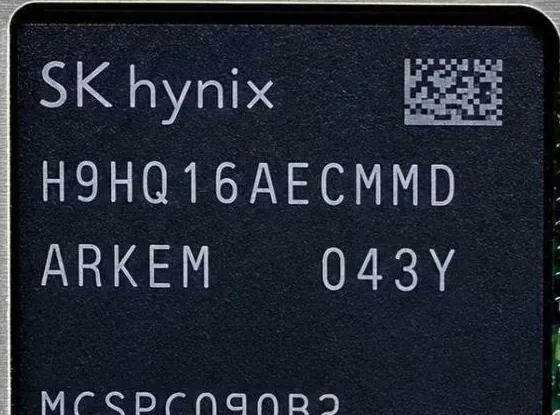
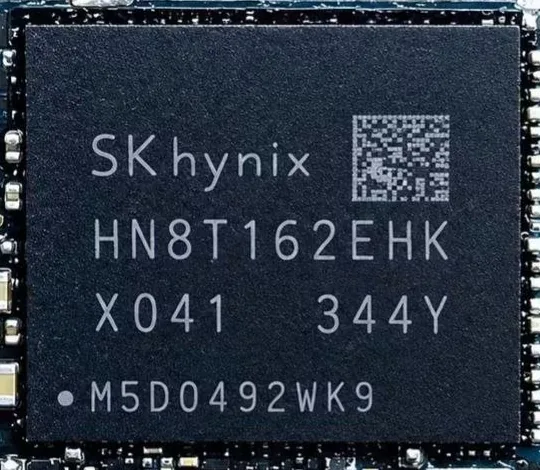
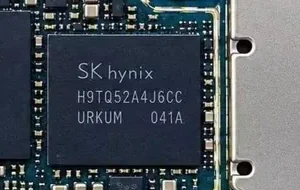
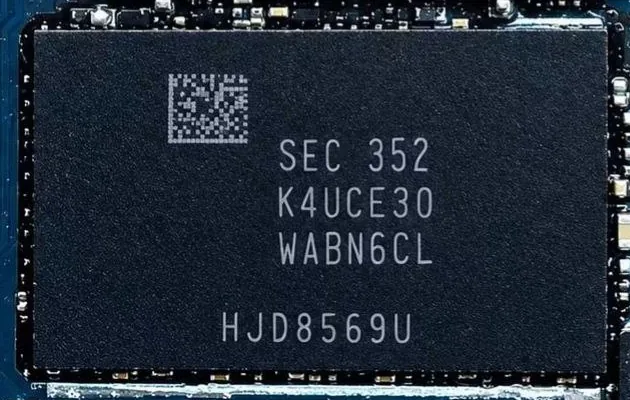
Type the code printed on the chip.
- eMMC
- eMCP
- UFS
- uMCP
Illustration. Codes and results shown are examples from the app.
See it on a real phone
Tap a screen to enlarge it.
Watch it work
Videos are played from YouTube, which may show its own ads.
Video not playing? Open it on YouTubeOne wrong GB, and you lose thousands!
In the scrap board trade, the biggest losses usually come from wrong information about a chip code's GB.
A 128 GB board is bought as 64 GB, and a 64 GB board is bought as 32 GB. The seller takes a direct financial loss.
- Real128 GBYou are told
64 GB - Real64 GBYou are told
32 GB
Nobody can remember the lakhs of mobile chip board codes and understand their patterns.
So check the GB yourself before you buy or sell a board.
Don't lose your hard-earned money just because you didn't know a chip code's GB.
Scan 1,000 mobile boards in very little time.
Pick a photo of the list and every code is read in a blink.
Three ways to check a chip
All three give the same answer: GB, company and type. All three speak the result.
Manual entry
Type the code and press Check. Works with the offline database and the cloud together.
Camera scan
Hold the camera over the chip. It reads the code live and keeps count of the chips you scan.
Gallery scan
Pick a photo of a whole code list. Every chip in it is read in a blink.
Built for the scrap market
For people who buy and sell mobile scrap boards.
GB, company and type
Every result shows the capacity in GB, the maker, and the chip type: eMMC, eMCP, UFS or uMCP.
Result spoken aloud
The app says the GB in Hindi in all three modes, so you can keep your eyes on the board.
Company decoders
Decoders for Samsung, SK Hynix, Micron and more read the part number by the maker's own rules, even when the exact code is not saved.
Offline database
Thousands upon thousands of chip codes are stored inside the app, allowing lookups to work without an internet connection.
Cloud sync
Add a new code to the cloud, and sync the latest codes into your app.
Storage and RAM told apart
In gallery scan, tap one chip to read only that chip. Storage chips get a green box with the GB, and RAM chips get an orange box.
Verified company decoders
Part numbers from these companies are decoded with their own numbering rules.
- Samsung
- SK Hynix
- Micron
- Kioxia / Toshiba
- SanDisk
- Kingston
- FORESEE (Longsys)
- BIWIN
- YMTC
- Silicon Motion
- ISSI
- SmartSemi
- SkyHigh
- Macronix
- Intelligent Memory
- Insignis
- Etron
- ESMT
Guides for scrap buyers
Plain-language guides to chip types and chip codes.
- Learn to decode a chip (animated, real chips)
- Four real chips, four steps each. Press Play and watch.
- Samsung letter ladder: 4 to 512 GB from one letter
- One family, one letter, every GB. With a practice quiz.
- How to find the GB from a chip code
- Step-by-step rules for Samsung, SK hynix and Micron codes.
- eMMC, eMCP, UFS and uMCP: the difference
- What each storage chip is, and how to tell them apart.
- Scrap board buying checklist (7 steps)
- Seven checks to do on every lot, before the money changes hands.
- RAM chip or storage chip?
- Read the right chip: which codes are RAM and which are storage.
- Mobile chip glossary (A to Z)
- Every word of the chip trade, explained in one line.
- What Samsung, SK hynix and Micron prefixes mean
- A quick reference for the most common chip code prefixes.
Questions, answered
Does it need internet?
No. Code lookup uses the database inside the app. Internet is only needed to sync with the cloud.
What if the camera can't read the code?
Type the code in by hand, or take a photo and use gallery scan.
How do I install the APK?
Open the downloaded file. When Android asks, allow installs from your browser or file manager, then tap Install.
How do I activate the app?
The app asks for a license key on first start. Message us on WhatsApp to get one.
What if my chip code isn't found?
Send us the code and a clear photo on WhatsApp, and we'll look into it.
How do I find the GB of a mobile chip from its code?
Read the main code on the storage chip. For many makers, one letter or two digits give the GB, for example the letter right after KLM on Samsung chips. Other codes, such as Micron's five-character codes, need a lookup. The app does both in one scan, and our guides show the rules step by step.
Which chip on the board is the storage chip?
The one whose code starts with a storage prefix such as KLM, KLU, KM, H26, HN8, H9TQ, H9HQ, MTFC or THG. Codes that start with K3 or K4 (Samsung) or H9HC (SK hynix) are RAM, not storage.
Try it on your next chip.
Download the app, scan one code, and see the GB, company and type for yourself.
Some stats about this chip checker